Star Font & Star2: A Celestial Dingbats Font for Creative Design
If you have ever searched for a way to add a touch of the cosmos to your projects, you have likely come across Star Font. This typeface, along with its companion Star2, belongs to the dingbats category with a strong celestial theme. Unlike conventional fonts that form letters and words, Star Font delivers a collection of star-shaped symbols, moons, orbits, and other astronomical motifs. Its purpose is not to replace your everyday text font but to complement it with visual elements that evoke wonder and elegance. Whether you are designing a wedding invitation, crafting decorations, or building a brand identity, Star Font offers a unique way to incorporate celestial imagery without relying on generic clip art. What sets it apart is its balance between decorative flair and practical usability—each glyph is carefully drawn to maintain clarity even at smaller sizes, making it suitable for both digital and print applications.
Understanding the Celestial Dingbats Font
A dingbats font like Star Font works by mapping symbols to keyboard characters. When you type a letter, instead of an alphabet character, you get a star, a crescent, or a stylized orbit. Star2 expands this library with additional variations, including filled and outlined stars, different point counts, and decorative swirls that suggest comets or nebulae. This system allows you to insert celestial elements directly into your text flow, which is far more efficient than importing separate images. The fonts are designed with consistent stroke weights and proportions, so they blend naturally with other typefaces. For instance, if you pair Star Font with a clean sans-serif body font, the stars will sit neatly beside your text without looking awkward or mismatched. This compatibility is one of its strongest features, as it reduces the friction of integrating decorative elements into professional layouts.
Key Characteristics of Star Font and Star2
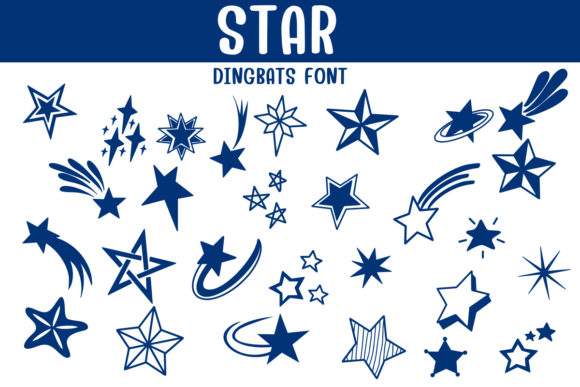
Both fonts share a cohesive visual language rooted in celestial imagery. The stars range from classic five-pointed shapes to more intricate eight-point and twelve-point variations. Moons appear in phases, from slender crescents to full circles with subtle craters. Additional glyphs include dotted lines that resemble star trails, circular orbits, and small sparkles that add a whimsical touch. Star2 introduces more ornate options, such as stars with internal cutouts and double-lined outlines, which work well for larger displays or focal points. The fonts are typically available in TrueType or OpenType formats, ensuring broad compatibility across design software, word processors, and even web platforms. Because they are vector-based, they scale infinitely without losing quality, which is essential for both tiny bullet points in a newsletter and oversized motifs on a poster. The monochrome nature of the glyphs also means they adapt easily to color changes—you can recolor them to match your palette without any loss of detail.
Where You Can Use Star Font in Real Projects
The practical applications of Star Font are broader than you might initially think. Below are several scenarios where this celestial dingbats font shines, along with examples of how creators are using it today.
- Wedding and event invitations: Replace standard bullet lists with tiny stars for a romantic, night-sky feel. Many couples use Star2 to create a border of alternating moons and stars around their invitation text. The result is elegant and custom without requiring illustration skills.
- DIY crafts and home decorations: Print the symbols onto cardstock, cut them out, and use them as stencils or decals. For example, you can create a constellation wall art piece by arranging Star Font glyphs in a pattern on a canvas and painting over them.
- Logos and branding: Small businesses, especially those in wellness, astrology, or children’s products, often incorporate a single star or moon from Star2 as a logo mark. The clean vector shape ensures it reproduces well on business cards, websites, and merchandise.
- Digital content and social media: Use the symbols as dividers between sections in a blog post, as accent marks in headlines, or as decorative backgrounds in Instagram stories. Because the fonts are text-based, they remain editable and searchable in design tools.
- Educational materials and worksheets: Teachers and homeschool parents can use the star shapes for grading stickers, reward charts, or astronomy-themed handouts. The consistency of the symbols helps maintain a professional look even in bulk-printed materials.
One real-world example comes from a small stationery shop that creates custom star maps for couples. They use Star Font to place exact star positions on their maps, then overlay Star2 ornaments to frame the date and coordinates. The owner notes that the font saves hours of manual drawing and ensures every map is perfectly symmetrical. Another example is a yoga studio that uses a single Star2 glyph as its logo, printed on mats, bags, and apparel. The studio owner chose the font because it scaled cleanly for embroidery and screen printing without losing detail.
Who Benefits Most from This Font
Star Font appeals to a wide audience, but certain groups will find it especially valuable. Graphic designers and illustrators can use it as a time-saving asset for adding celestial motifs without drawing from scratch. Business owners who manage their own marketing materials—such as Etsy sellers, wedding planners, and boutique retailers—can elevate their visuals without hiring a designer. Hobbyists in scrapbooking, card making, and journaling will appreciate the variety of symbols for themed layouts. Even web developers can embed the font via CSS to add decorative elements to digital interfaces without loading heavy image files. The low barrier to entry is a key advantage: you do not need advanced design skills to use Star Font effectively. If you can type and select a font, you can incorporate stars into your work.
Strengths and Considerations When Using Star Font
Like any specialized tool, Star Font has strengths that make it ideal for certain tasks, as well as limitations to keep in mind. Understanding these will help you decide whether it suits your project.
- Strength: Ease of use. Because it is a font, you can insert symbols with a single keystroke. No need to open separate image editors or manage layers. This speed is invaluable when working on tight deadlines.
- Strength: Scalability. Vector fonts maintain crisp edges at any size. A star used as a 12pt bullet in a document will look just as clean as a 200pt decorative element on a poster.
- Strength: Consistent styling. All glyphs share the same line weight and design language, which creates a unified look across your project. Mixing celestial clip art from different sources often leads to mismatched styles.
- Consideration: Limited to symbols. Star Font does not include letters or numbers. You must pair it with a standard text font for any written content. This is typical for dingbats fonts, but it means you cannot rely on it alone for complete typography.
- Consideration: Not all glyphs are intuitive. The mapping of symbols to keyboard keys is rarely obvious. You will likely need a cheat sheet or the font’s documentation to find specific stars or moons. This learning curve is minor but worth noting.
- Consideration: Overuse can feel gimmicky. Applying celestial symbols too liberally can make a design look cluttered or thematically forced. Use Star2 sparingly as an accent rather than a primary visual element for the best effect.
In practice, these considerations are manageable. For example, if you plan to use the font frequently, you can create a custom keyboard map or save frequently used glyphs as text snippets. Many designers also find that the limitations actually guide their creativity—constraints often lead to more focused and intentional designs.
How to Evaluate Suitability for Your Project
Before committing to Star Font for a specific project, ask yourself a few questions. First, does the celestial theme align with your message or brand identity? A star motif works beautifully for events like weddings, new product launches, or educational content about astronomy, but it may feel out of place for corporate finance or heavy machinery industries. Second, consider the reproduction medium. For digital screens, the font works perfectly in any size. For print, test a sample at your intended size and resolution—especially if you plan to use very small stars, as fine details may be lost on low-quality paper. Third, think about the audience. Children and young adults often respond positively to celestial imagery, while a more conservative professional audience might prefer subtle accents rather than prominent star clusters. Finally, evaluate the font’s compatibility with your existing tools. Most modern design software and word processors support OpenType features, but older programs may not render all glyphs correctly. Checking a quick test file before beginning production can save time and frustration.
Practical Tips for Getting the Most Out of Star Font
To use Star Font and Star2 effectively, start by exploring the full glyph set. Open your design software’s character map or glyph panel to see all available symbols. You will likely discover hidden gems—like a subtle orbit line or a double-star combination—that you would not have found by guessing key combinations. Next, experiment with color and layering. A single star in your brand color can serve as a bullet point, but stacking two different star glyphs from Star2 at different rotations creates a unique ornament. For print projects, try using the font in combination with metallic inks or foil stamping. The clean vector outlines of Star Font are ideal for foil because they have clear boundaries and no unnecessary detail. For digital projects, consider applying a subtle glow effect to the stars to simulate a night sky. Even a simple drop shadow can add depth without overwhelming the design. Lastly, share your custom combinations with other creators. Many online communities trade tips for using dingbats fonts in innovative ways, and you might discover uses you had never considered.
Final Thoughts on Star Font and Star2
Star Font and Star2 occupy a valuable niche in the world of typography. They offer a quick, elegant way to incorporate celestial symbols into creative work without sacrificing quality or consistency. Whether you are designing a wedding suite, crafting a logo, or decorating a classroom, these fonts provide reliable tools that respect your time and your vision. Their strengths lie in simplicity, scalability, and stylistic coherence, while their limitations are typical of dingbats fonts and easily managed with a little planning. By understanding what they offer and where they fit best, you can make informed decisions that enhance your projects rather than complicate them. The next time you need a star, a moon, or a touch of cosmic charm, Star Font and Star2 are ready to deliver—no clip art required.