Halloween Bat Font: A Playful Dingbats Typeface for Spooky Designs
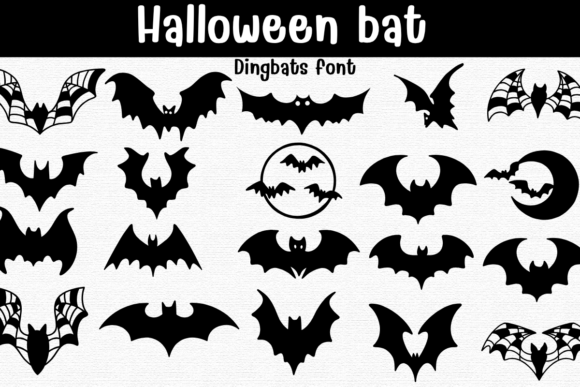
The Halloween Bat Font brings a fresh, flexible approach to seasonal design. Unlike standard typefaces that rely on letters and numbers, this dingbats font replaces the keyboard with bat icons, crescent moons, webbed wings, and circular badges. Every glyph is a clean, scalable vector, ready for solid fills or crisp coloring outlines. Whether you're designing stickers, T-shirts, party invites, posters, decals, laser stencil crafts, scrapbook pages, or seasonal branding, the Halloween Bat Font delivers a playful yet polished look that fits both digital and physical projects.
What sets this typeface apart is its balance between whimsy and practicality. The bat icons range from cute cartoon bats with wide eyes to dramatic wide-wingspan silhouettes that feel right at home on a dark, moody poster. There are crescent-moon scenes that add a touch of mystery, webbed wings that suggest movement, and circular badges that work well as standalone emblems or repeating patterns. Because everything is mapped to the keyboard, you can type out a full composition in seconds, then adjust sizing, color, and spacing without ever losing quality.
Why a Dingbats Font Works for Halloween Projects
Dingbats fonts have a long history in design, but they often feel limited to clip-art-style use. The Halloween Bat Font breaks that mold by offering a cohesive set of icons that can be combined, layered, and recolored like any other typeface. This means you get the speed of typing with the flexibility of vector graphics. For designers who need to produce multiple assets quickly, that combination is invaluable.
Think about a typical Halloween party invite. You might want a border of bats around the text, a central moon motif, and a few decorative elements to frame the details. With a standard font, you'd hunt for individual images, resize them, and hope the styles match. With the Halloween Bat Font, you simply type the characters in a row, adjust the tracking, and change the color to match your theme. The result looks intentional and cohesive because every glyph shares the same design language.
The same principle applies to T-shirt designs. A single bat icon repeated across the front of a shirt can look bold and graphic. Or you can combine a large bat with a moon badge and a few smaller bats to create a balanced composition. Because the font includes both solid and outline versions of many glyphs, you can mix fills and strokes for added depth. Printers appreciate the clean vector outlines, and you can resize the artwork to fit any garment size without worrying about pixelation.
Scalable Vectors and Lossless Editing
One of the strongest arguments for using a font-based approach is the lossless workflow. Every Halloween Bat Font glyph is a vector, so scaling up to poster size or shrinking down to a sticker label never compromises sharpness. In pro-level apps like Procreate, Affinity Designer, or Affinity Photo, you can treat each character as a shape, apply gradients, add shadows, or warp the outline to fit a curved surface. The font file installs as an OTF or TTF, so it works across Mac, Windows, and iPadOS without extra steps.
For laser stencil crafts, this is a game-changer. You can type out a bat pattern, convert the text to paths, and send the vectors directly to a laser cutter or vinyl plotter. The clean edges mean less cleanup after cutting, and the variety of wing shapes allows you to create stencils that range from simple silhouettes to intricate webbed designs. If you're making decals for windows or car bumpers, the same font file gives you a consistent style across multiple pieces.
Practical Applications Across Industries and Projects
The Halloween Bat Font isn't just for graphic designers. Scrapbook enthusiasts can use it to add themed elements to pages without hunting for stickers. Party planners can create custom banners, cupcake toppers, and table signs that all share the same visual language. Small business owners selling seasonal merchandise can produce entire product lines—from mugs to tote bags to coasters—using one font as the creative foundation.
Consider a local coffee shop that wants to run a Halloween promotion. They need posters, social media graphics, and maybe a limited-edition cup sleeve. With the Halloween Bat Font, they can type out bat motifs for the poster, create a repeating border for the sleeve, and use a moon badge as a social media avatar. Everything stays on-brand because every element comes from the same typeface. The consistency builds recognition, and the playful bats fit the holiday mood without looking generic.
For event branding, the font offers a level of detail that clip art often lacks. The crescent-moon scenes include subtle curves that suggest a night sky, while the circular badges feel like enamel pins or stamps. You can use the badges as focal points or repeat them as a pattern fill. The webbed wings add a slightly spooky edge that works well for haunted house promotions, while the cute cartoon bats keep the tone light for children's parties. This range means you can address different audiences with the same tool.
Combining Characters for Unique Compositions
Because the Halloween Bat Font is a typeface, you can combine characters in ways that aren't possible with individual images. For example, you might type a large bat glyph, then layer a smaller moon badge on top of its body, then add tiny bats around the edges by adjusting the font size and tracking. The result looks like a custom illustration, but it was built entirely from typed characters. This approach works especially well for quick mockups, where you need to present a concept to a client before committing to a full illustration.
Another technique is to use the font for pattern creation. Type a sequence of bats, moons, and badges, copy the line, and offset it slightly in your design app. Then change the color of every other line to create a two-color repeating pattern. The font's consistent spacing means the pattern tiles seamlessly, and you can adjust the density by changing the font size or tracking. For wrapping paper, gift tags, or fabric prints, this method saves hours of manual placement.
Workflow Considerations for Designers
Installation is straightforward: download the OTF and TTF files, double-click to install, and the font appears in the font menu of any app that supports type. In Procreate, you can use the Text tool to type bat glyphs, then rasterize the layer if you want to paint over them. In Affinity Designer and Photo, the font behaves like any other typeface, so you can keep the text editable or convert to curves for further manipulation. The same applies to Adobe apps, CorelDRAW, and most vector editing software.
One practical tip: because dingbats fonts map to standard keyboard keys, you'll want to keep a reference sheet handy until you memorize which key produces which bat. Many designers open a test document and type all the keys to see the full glyph set. Once you know the layout, typing out compositions becomes second nature. The Halloween Bat Font includes a variety of options, so expect to find multiple bat poses, moon phases, and decorative badges across the keyboard range.
Recoloring and Styling for Different Outputs
Since the font is vector-based, recoloring is instantaneous. You can create a black-on-orange poster, a white-on-purple T-shirt design, or a gold-on-black sticker set, all from the same font file. For multicolor designs, you can duplicate the text layer, change the fill color, and nudge the copy slightly to create a shadow or outline effect. The crisp outlines of the Halloween Bat Font make this technique look clean even at small sizes.
For screen printing, the font's clean vectors mean fewer separations and less risk of misregistration. The solid fills are true shapes, so they print evenly, and the outline versions can be used as halftone base layers. If you're printing on dark garments, the white outline variants give you a ready-made underbase layer that matches the bat shapes exactly. This reduces prep time and ensures the final print looks sharp.
Choosing the Right Bat for the Job
The Halloween Bat Font includes bats with wide wingspans that suggest flight and movement, cute cartoon bats with rounded heads and big ears, and webbed-wing bats that lean into the spooky side. For a children's party invitation, the cute bats and moon scenes create a friendly, whimsical vibe. For a horror-themed event or a Halloween haunted house, the wide-winged and webbed bats build atmosphere without needing additional artwork.
The circular badges deserve special mention. They work well as logos, stamps, or accent elements. You can place a badge in the corner of a poster, use it as a sticker design, or repeat it as a pattern. Because they're mapped to the keyboard, you can type a row of badges with different internal details and then arrange them in a grid for a cohesive set of icons. This is particularly useful for social media templates where you need multiple variations of a theme.
Seasonal Branding and Year-Round Use
While the Halloween Bat Font is obviously tailored for October, its applications extend beyond one month. Gothic-themed businesses, alternative fashion brands, and dark aesthetic bloggers can use the bats as part of their year-round identity. The crescent-moon scenes work well for night-sky motifs, and the webbed wings fit into steampunk or fantasy projects. The neutral black-and-white outlines mean the font blends easily with other design elements without clashing.
For seasonal branding, the font gives you a consistent way to update your look each year. If you sell Halloween products, you can create new designs every season using the same font, which builds brand recognition. Customers who bought a bat sticker last year will recognize the style on this year's T-shirt, creating a sense of continuity. And because the font is lossless, you can reuse old vector files and simply change the colors or layout to refresh the design.
Final Thoughts on the Halloween Bat Font
The Halloween Bat Font stands out because it treats bats as design elements rather than mere decorations. The variety of poses, the inclusion of scene-based glyphs like crescent moons and circular badges, and the practical vector format make it a versatile tool for anyone working with Halloween themes. Whether you're a professional designer producing merchandise at scale, a hobbyist scrapbooking family memories, or a small business owner creating seasonal promotions, this typeface gives you a unified visual language that's quick to use and easy to adapt.
The next time you need a bat motif, consider reaching for a font rather than a clip-art library. The Halloween Bat Font puts a complete set of icons at your fingertips, mapped to your keyboard and ready to type. Sizing, recoloring, and combining characters become frictionless tasks, letting you focus on composition and creativity. And because everything stays vector, your artwork remains sharp from concept to final production. That's a workflow advantage worth having, especially when you're working against a deadline or producing multiple pieces for a seasonal launch.